Improve your skills

Showing posts with label Database. Show all posts

August 19, 2016

Insert Multiple Rows with One Query or Statement in SQL Server


Here I will explain, many different ways to insert multiple rows with single insert query or statement in SQL Server with example. 

There are most three different methods describe as shown below-

First of all we create a test table (Here my table name is 'tblStudent').


-- create test table 'tblStudent'
CREATE TABLE tblStudent(RollNo INT, Name VARCHAR(100))


Method-1: INSERT Statement
The SQL Server (Transact-SQL) INSERT statement is used to insert a single record or multiple records into a table in SQL Server.

Syntax:
INSERT INTO table
(column1, column2)
VALUES
(expression1, expression2),
(expression1, expression2)

Example:
-- insert multiple rows using INSERT statement
INSERT INTO tblStudent
(RollNo, Name)
VALUES
(100101, 'Harry'),
(100102, 'Michale'),
(100103, 'John'),
(100104, 'Smith')


Method-2: INSERT SELECT Statement

Syntax:
INSERT INTO table1(column1, column2)
SELECT column1, column2 FROM table2

Example:
-- insert multiple rows using INSERT SELECT statement
INSERT INTO tblStudent(RollNo, Name)
SELECT EmpId, EmpName FROM tblEmployee


Method-3: INSERT SELECT UNION ALL Statement

Syntax:
INSERT INTO table(column1, column2)
SELECT expression1, expression2
UNION ALL
SELECT expression1, expression2
UNION ALL
SELECT expression1, expression2

Example:
-- insert multiple rows using INSERT SELECT UNION ALL statement
INSERT INTO tblStudent(RollNo, Name)
SELECT 100101, 'Harry'
UNION ALL
SELECT 100102, 'Michale'
UNION ALL
SELECT 100103, 'John'
UNION ALL
SELECT 100104, 'Smith'


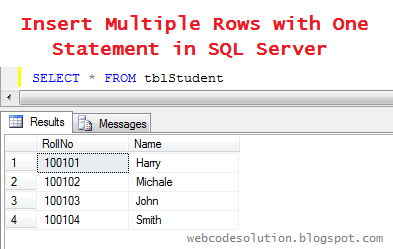
After that, When we run following query in SQL Query window it will return all inserted records with single query like as shown below- 


Result:
-- view all insert data from test table
SELECT * FROM tblStudent

insert-multiple-rows-with-one-query-or-statement-in-sql-server


August 12, 2016

Add Row Number in SQL Select Query Without Using ROW_NUMBER()


This article explain, how we can add sequence row number to a SQL select query starting from 1 onward without using ROW_NUMBER(). 

Following example describe all process step by step in easy way.

Example-

First of all we create a test table and assign some dummy data (Here my table name is 'tblStudent') as below-
how-to-add-row-number-without-using-row-number-function-in-sql-server


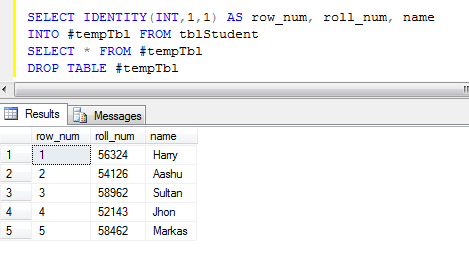
Write and run following query in SQL Query window.

-- insert data into a temp table '#tempTbl' with a new identity(1,1) column
SELECT IDENTITY(INT,1,1) AS row_num, name 
INTO #tempTbl FROM tblStudent

-- select all data from temp table
SELECT * FROM #tempTbl

-- drop temp table after getting final result
DROP TABLE #tempTbl


Result:
how-to-set-row-number-in-select-query-in-sql-server


July 30, 2016

SQL Server – Insert Data From One Table to Another Table


There are two ways to insert data from one table to another table.


1. INSERT INTO SELECT  statement-

The INSERT INTO SELECT statement is used to copy data from one table and insert into another table.
  • It is used when the table is already created in the database.
  • If columns listed in insert clause and select clause are same then not required to list them in the query but if you are listed them, it's easy to understand.
We can also use WHERE condition in query to filter data from table.

Syntax:
-- for copy all columns from one table to another
INSERT INTO table1 
SELECT * FROM table2
Note: Number of columns must be same in both tables.

-- for copy selected columns from one table to another
INSERT INTO table1(COLUMN1, COLUMN2)
SELECT COLUMN1, COLUMN2 FROM table2

Example:
-- create new table 'tblStudent'
CREATE TABLE tblStudent(first_name nvarchar(100), last_name nvarchar(100))

-- insert data in to 'tblStudent' table from table 'tblPerson'
INSERT INTO tblStudent(first_name, last_name)
SELECT firstName, lastName FROM tblPerson WHERE profession = 'student'

-- check data is inserted in 'tblStudent' table
SELECT first_name, last_name FROM tblStudent


2. SELECT INTO statement-

The SELECT INTO statement first create table and then select data from one table and insert it into the another table.
  • This method is used when the table is not created in the database and needs to be created when data inserted from another table. The new table is created with the same column name and data types as selected columns.
Syntax: 
SELECT COLUMN1, COLUMN2 INTO table1 FROM table2

Example:
-- create new table 'tblStudent' and insert data from table 'tblPerson'
SELECT firstName, lastName INTO tblStudent FROM tblPerson WHERE profession = 'student'

-- check data is inserted in 'tblStudent' table
SELECT first_name, last_name FROM tblStudent

Result:
How-to-insert-or-copy-data-from-one-table-to-another-table-in-sql-server


Subscribe for Latest Update

Popular Posts