

Sometimes we want to validate date in dd/mm/yyyy format. For validate date, we use regular expression that simply checks whether the input date is valid or not.
First, we take a input text and a input button in body as show in below-
HTML:
<body>
<form id="form1">
<input id="txtDate" type="text" placeholder="dd/mm/yyyy" />
<input type="button" value="Check" onclick="isValidDate('txtDate');" /><br/>
<span id="msg" style="color:green;"></span>
</form>
</body>
<form id="form1">
<input id="txtDate" type="text" placeholder="dd/mm/yyyy" />
<input type="button" value="Check" onclick="isValidDate('txtDate');" /><br/>
<span id="msg" style="color:green;"></span>
</form>
</body>
After that, attach the jquery library link on your head part of page and write the below javascript code in head part shown as below-
JS:
<head>
<title>Javascript Date Validation dd/mm/yyyy Format Regular Eexpression JQuery</title>
<script src="https://code.jquery.com/jquery-3.1.0.min.js" type="text/javascript"></script>
<script type="text/javascript">
function isValidDate(txtId) {
$('#msg').html('');
var txtDate = $('#' + txtId).val().trim();
if (txtDate != '') {
var date_regex = /^(0[1-9]|1\d|2\d|3[01])\/(0[1-9]|1[0-2])\/(19|20)\d{2}$/;
if (!(date_regex.test(txtDate))) {
alert('Invalid Date! Date must be in dd/mm/yyyy format.');
$('#' + txtId).val('');
$('#' + txtId).focus();
return false;
}
else {
$('#msg').html('Valid Date... :)');
}
}
else {
alert('Please enter date.');
}
return true;
}
</script>
</head>
<title>Javascript Date Validation dd/mm/yyyy Format Regular Eexpression JQuery</title>
<script src="https://code.jquery.com/jquery-3.1.0.min.js" type="text/javascript"></script>
<script type="text/javascript">
function isValidDate(txtId) {
$('#msg').html('');
var txtDate = $('#' + txtId).val().trim();
if (txtDate != '') {
var date_regex = /^(0[1-9]|1\d|2\d|3[01])\/(0[1-9]|1[0-2])\/(19|20)\d{2}$/;
if (!(date_regex.test(txtDate))) {
alert('Invalid Date! Date must be in dd/mm/yyyy format.');
$('#' + txtId).val('');
$('#' + txtId).focus();
return false;
}
else {
$('#msg').html('Valid Date... :)');
}
}
else {
alert('Please enter date.');
}
return true;
}
</script>
</head>
Now save the file and run on browser.
When the 'Check' button is clicked then the isValidDate() function will be called. If the input date doesn't match the regular expression then an error message is displayed and stop the form from submitting by returning a false value.
Result:
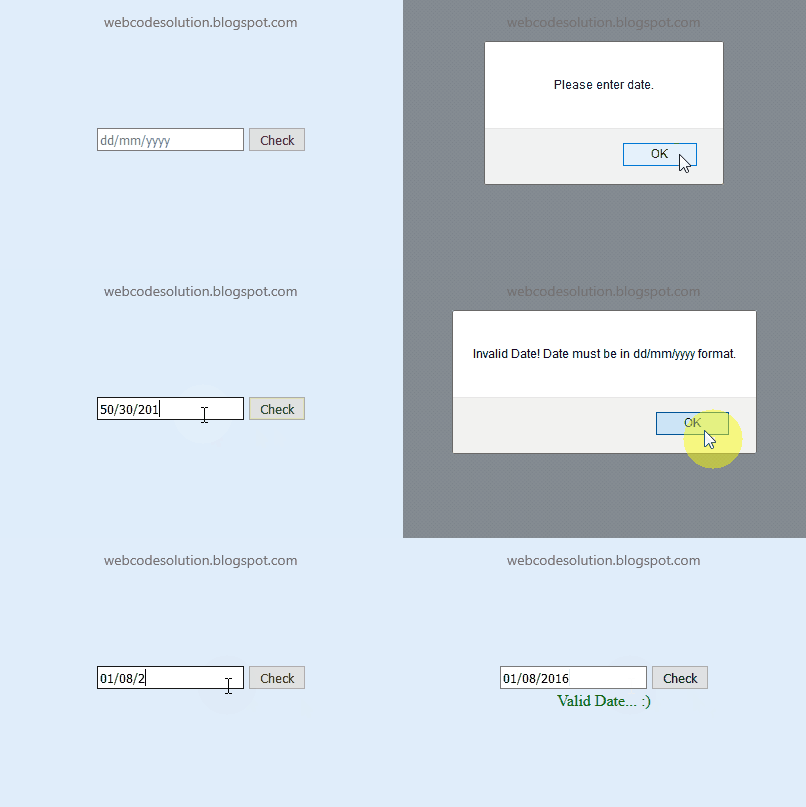
Live Demo:


